Lead routing that gets every lead to the right rep, inside the SLA
Lead routing is the set of rules that decides which rep, team or queue gets each new lead, and how fast they must act on it. Good routing classifies the lead first, then picks the owner, then starts a response timer with a fallback if nobody acts. LeanScale designs, builds and runs lead routing inside Salesforce and HubSpot for B2B SaaS companies, and keeps it working when your team changes.
What lead routing is, and where it starts and stops
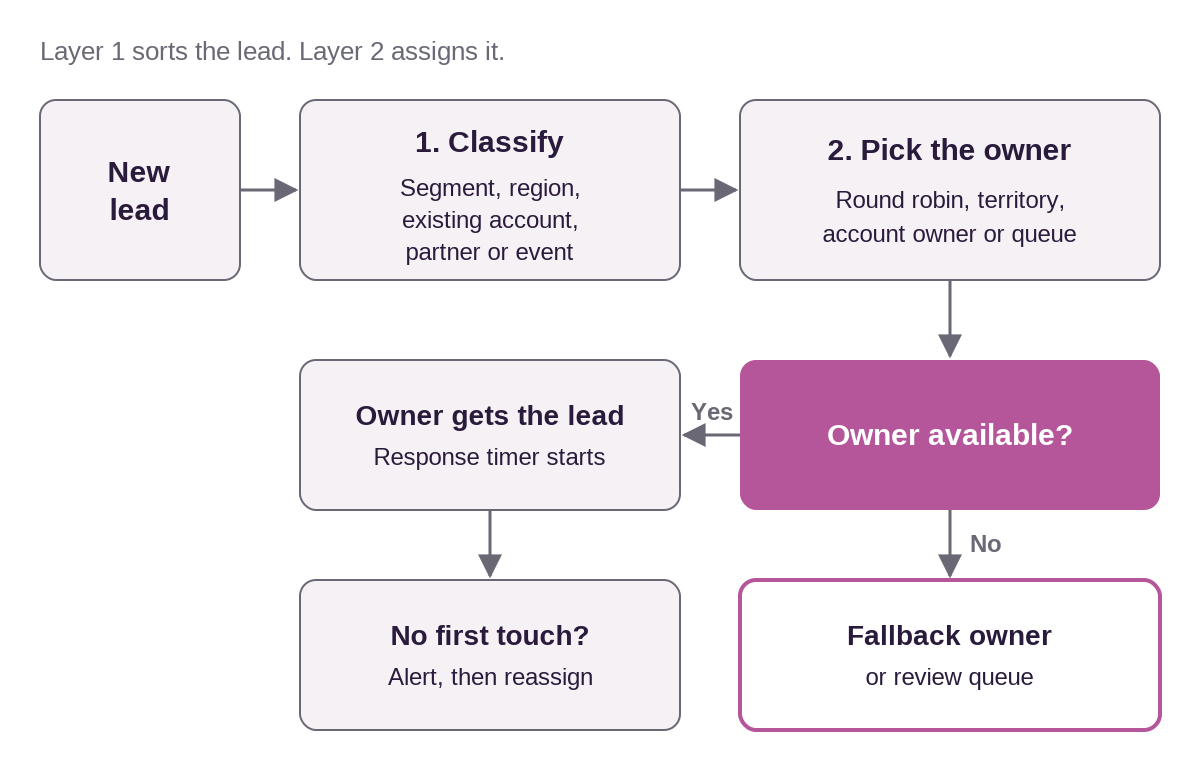
Lead routing runs the moment a lead is created or qualifies. It ends when a named owner has made first contact within a service level agreement (SLA) for response time. It makes two decisions, in this order.
Layer 1
Classify the lead
What segment, what region, does it belong to an existing account, is it a partner or an event lead.
Layer 2
Pick the owner
Round robin within a pod, the territory owner, the account owner, or a queue. Lead assignment, setting the owner field, is only the last step of that decision.
Most broken routing we see has the second layer built carefully and the first layer left to chance. The rules are right and the inputs are wrong.
The symptoms
Signs your lead routing is broken
You rarely see a routing failure directly. You see its side effects.
01
The lead nobody got
Reps say they never got it. The CRM says they did.
02
Enterprise leads with commercial reps
The company size field was empty when routing fired.
03
Customers called cold
A lead from an existing customer goes to a new-business rep, who calls your champion cold.
04
Leads waiting on nobody
Unassigned over a weekend, or sitting with a rep who is on holiday.
05
No response time by source
Nobody can say how long it takes from form fill to first call.
06
Rules edited by hand
Every new hire, territory change or new product line means someone editing assignment rules.
If two or more of those sound familiar, the problem is usually the design, not effort. Read why leads do not get worked for the longer diagnosis.
The models
The five lead routing models, and when each one fits
Pick the model before the tool. The model decides what data you need and how complex the tooling has to be. Each one is covered in more depth in our lead routing models answer.
Model
Fits when
Needs before you build
How it usually fails
Round robin
Speed matters more than ideal ownership; a pod of reps sells the same thing
A rep roster with availability and a fallback owner
Leads go to reps who are out, or the rotation ignores capacity
Territory
Reps own a region, a size band or an industry
Defined territories, a named owner per territory, enriched location and size data
Routing fires before enrichment, so the territory field is blank
Target account (account-based marketing, ABM)
Named accounts belong to named reps
An agreed target-account list and reliable lead-to-account matching
New contacts from a target account go to the round robin instead of the owner
Hybrid
Different segments need different rules
Clear segment cutoffs and an order of precedence between rules
Rules overlap, and the first one to fire wins by accident
Manual
Very low volume, or a short-term holding pattern
A named triager and a response window for triage
The triager becomes the bottleneck
Round robin
Round robin lead assignment
The default for velocity segments, and easy to build natively. Take care with availability (out of office, capacity caps) and the fallback when nobody in the pod can take the lead.
Territory
Territory routing at intake
This page covers matching an incoming lead to a territory you have already defined. How to carve territories in the first place is a planning exercise; our sales territory design playbook covers it.
ABM and hybrid
Target account and hybrid routing
Where most teams outgrow native tools, because they depend on matching a lead to the right account before any rule runs.
Prerequisites
What has to be true before lead routing can work
Most routing projects fail on inputs, not rules. Check these before anyone opens a flow builder. The full list is in our routing prerequisites answer.
01
Enrichment that finishes before routing fires
Covered in the next section.
02
A rep roster with coverage and fallbacks
Who is in which pod, who covers whom, and where a lead goes when nobody is available. Native tools do not always decide this for you: HubSpot's rotation action, for example, assigns no owner at all when no user is eligible, according to HubSpot's own documentation.
03
A response window for each lead source
See speed to lead below.
04
Rules of engagement for the edge cases
Event leads, partner-sourced leads, leads from existing customers, and leads from accounts already in an open deal.
05
Lead-to-account matching you trust
The matching order is two sections down.
Enrichment timing
Why leads get routed on blank fields
Routing rules read fields: company size, country, industry. Enrichment fills those fields. If routing fires the moment a lead is created and enrichment lands a few seconds or minutes later, the rules read blanks.
A blank size field usually falls through to the default branch, often the commercial team or a general queue. Nothing errors; the lead simply goes to the wrong person.
Check
How to check
Pull a week of misrouted leads and compare the time each lead was assigned with the time its enrichment fields were last updated. If the fields changed after assignment, you have a timing problem, not a rules problem. Our routing and enrichment timing answer covers it in detail.
Fix
How to fix it
Make routing wait for enrichment, with a short timeout and a defined branch for leads that never enrich. Do not let "unknown" fall silently into a sales queue.
Matching order
Lead to account matching: the order that works
Before a lead can go to an account owner, the system has to know which account it belongs to. Match on the strongest signal first, and stop as soon as you have a confident match.
01
Email domain
Against account domains, excluding free email providers.
02
Enriched company domain
For leads that signed up with a personal email.
03
Fuzzy company name
Only above a confidence threshold you have tested.
04
A human review queue
For everything else. A person checking a short list each day is cheaper than a champion getting a cold call.
Speed to lead: set the SLA by source, then measure it step by step
Speed to lead is the time from a lead raising its hand to a rep making first contact. Few teams can measure it, which means few teams know whether they meet it.
One SLA per source, not one for the company
A demo request and a webinar attendee are not the same lead. Give high-intent sources a short window and a dedicated path, and lower-intent sources a longer one. The number matters less than the instrumentation; our speed-to-lead SLA answer explains the approach.
Four timestamps
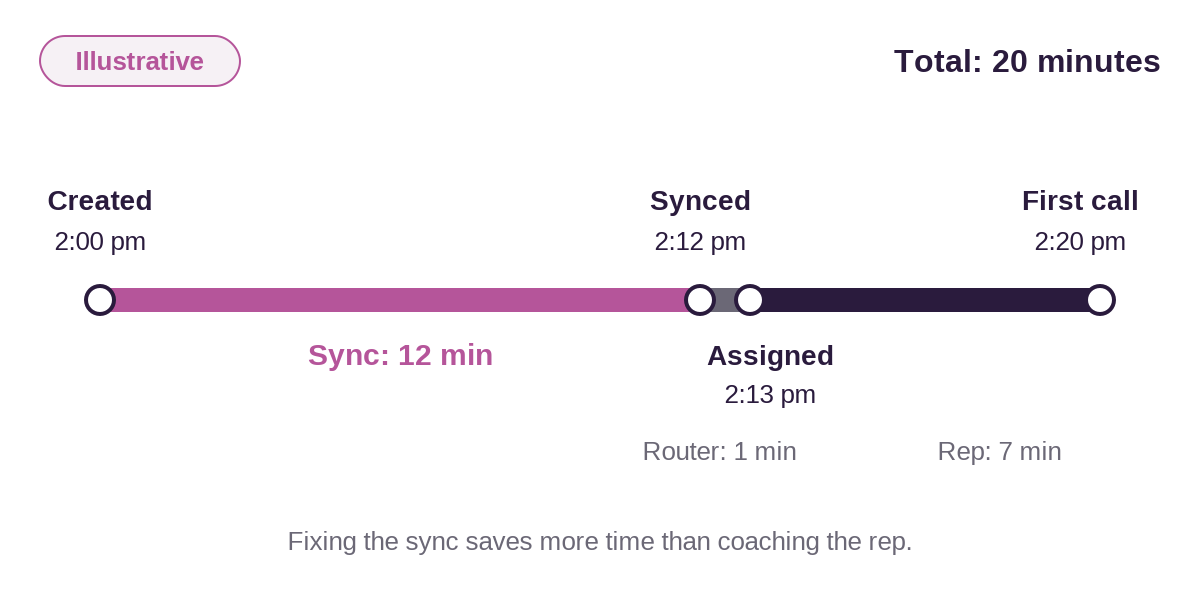
Created, synced to the CRM, assigned, first activity. The gap between each pair shows where the time goes: the form, the sync, the router or the rep.
A worked example (illustrative numbers)
Timestamp
Time
Gap since last step
Where the time went
Created (demo request)
2:00 pm
Synced to the CRM
2:12 pm
12 minutes
The sync
Assigned
2:13 pm
1 minute
The router
First activity (call)
2:20 pm
7 minutes
The rep
Total response time: 20 minutes. Coaching the rep would save a few minutes; fixing the sync would save most of the delay. Without the timestamps, the team would have blamed the rep.
Tools
Lead routing software: native rules or a dedicated router?
Most teams buy a router too early or too late. The trigger is blend complexity, not lead volume. Our full answer is do we need LeanData or Chili Piper.
Native routing is enough when
You run one model on clean data: a round robin, or territory routing with reliable enrichment. Salesforce lead assignment rules and Flow, or HubSpot workflows and rotation, handle that well.
A dedicated router earns its cost when
You blend models (territory for one segment, account owner for target accounts, round robin for the rest, a partner path and a fallback queue), or when lead-to-account matching is the hard part.
The job
Tools built for it
Blended routing logic across models and accounts
LeanData, Traction Complete
The moment of conversion: booking the meeting or routing the chat while the buyer is still on the page
Chili Piper, Qualified
If you are looking at Chili Piper alternatives, decide first which of those two jobs you are hiring the tool for.
Implementation
Salesforce lead routing and HubSpot lead routing in practice
The model and the rules are the same in either CRM. What changes is where the logic lives and how the systems sync.
Salesforce
Salesforce lead assignment rules
Native assignment rules handle simple criteria and queues, with one active rule per object and a default owner when nothing matches (see Salesforce's documentation on assignment rules). Once you need availability, rotation or account matching, the logic usually moves to Flow or a dedicated router. Keep one place where routing logic lives; split logic is the hardest kind to debug.
HubSpot
HubSpot lead routing
Workflows can rotate leads among owners and skip users marked as away. If HubSpot feeds Salesforce, check when the sync actually fires: a lead that waits for the next sync cycle loses time before routing even starts.
Routing changes are tested in production far too often. Write the scenarios down first and run every one before cutover.
01
A lead in each segment and each region.
02
A lead from an existing customer and from an account in an open deal.
03
A partner-sourced lead and an event lead.
04
A lead that arrives with no enrichment.
05
A lead that matches no account, and one that matches two.
06
A lead that arrives when every eligible rep is out of office.
Record the expected owner for each, run them, and compare. Then watch the misroute queue daily for the first weeks after go-live.
Maintenance
Why lead routing breaks after go-live, and who should own it
Routing rarely fails on launch day. It fails three months later, when a rep leaves, a territory is split or a new product line launches, and nobody updates the rules. Leads keep flowing; they just go to the wrong place, or to someone who is no longer there.
Name an owner for routing changes, and tie the review to the events that break it.
01
Every hire and departure.
02
Every territory change.
03
Every new product or segment.
04
Every new lead source.
Working with us
How we design, build and run lead routing
LeanScale is an embedded GTM Ops team. A pod from our Marketing Operations and Revenue Operations practices works inside your CRM with your team. A routing engagement follows the four phases in our lead routing playbook:
01
Blueprint
Discovery with sales leadership and sales ops, the routing model, the prerequisites check, and a routing flowchart your team approves.
02
Build
Enrichment timing, rules, fallbacks, SLA timers and alerting, in native tools or a dedicated router, tested against the scenario list.
03
Enable
Documentation, rep training and a speed-to-lead dashboard for the sales leaders who watch it.
04
Maintain
We own the rule changes when territories, headcount or products change.
It runs as a 90-day rolling subscription. Projects move on 4 to 12 week cycles, and ad hoc support is uncapped with a same-day SLA, which matters for routing: a broken rule on a Monday morning should not wait for the next sprint.
“They combine strategic RevOps thinking with hands-on execution, not just high-level recommendations. They help us actually design, document, and implement the systems we need.”
“LeanScale is an absolute partner in our go-to-market motion. They are experts when it comes to our technology stack as well as our business processes.”
David B., via G2
FAQ
Lead routing questions, answered
01
What is lead routing?
Lead routing is the set of rules that decides which rep, team or queue gets a new lead and how fast they must act. It classifies the lead first (segment, region, existing account) and then picks the owner (round robin, territory, account owner or queue).
02
Do we need LeanData or Chili Piper, or is native routing enough?
Native Salesforce or HubSpot routing is enough for a single model on clean data. A dedicated router earns its cost when you blend several models or when lead-to-account matching is the hard part. The trigger is complexity, not lead volume.
03
What is the 5 minute rule for leads?
It is common advice to contact an inbound lead within five minutes. Whether five minutes is right for you depends on the source and your team. Start by timestamping each step from form fill to first activity, so you know your real response time before you set a target.
04
How is lead routing different from the lead lifecycle?
The lifecycle decides when a lead counts as qualified and what stage it is in. Routing decides who gets it and how fast. We cover stage definitions and the MQL to SQL handoff on our lead lifecycle page, and assignment, SLAs and routing tools on this one.
05
Who can fix lead routing in HubSpot and Salesforce?
LeanScale designs, builds and runs lead routing in Salesforce, HubSpot or the CRM you already use, as an embedded team from our Marketing Operations and Revenue Operations practices. Whoever you choose, ask whether they build in your CRM and who owns routing after go-live.
06
How long does a lead routing project take?
We run projects in 4 to 12 week cycles inside a 90-day rolling subscription. The scope sets the length: a single round robin is quick, while a hybrid model with account matching and a new router takes longer. After go-live, routing changes go through uncapped ad hoc support with a same-day SLA.
Get started
Find out where your leads are going missing
A GTM Diagnostic is a read-only review of your CRM across our four practices. It shows where leads wait, where they misroute and what to fix first. Then you decide whether you want us to build it.


 Mistral AI
 Chainguard
 AssemblyAI
 Clio
 Fountain
 RunPod
 Factory.ai
 Ocrolus
 Anrok
 Act-On
 GreyNoise
 Integrate.io
 CallRail
 Patlytics
 SpyCloud
 Scandit
 Coactive
 wealth.com
 OpenArt
 OnBoard